Skeptics aside, lawyers already use AI
The failures get the headlines: AI-generated fake evidence, or invented precedents that surface mid-case. Those stories travel because they are easy to catch and fun to write up. The quiet successes outnumber them many times over, but nobody counts those. A clean first draft of a motion, or a contradiction in the testimony caught at the right moment, never makes the news.
The question stopped being “should we use AI” a long time ago. It is now “how do we use it without getting burned.” The firms that have wired AI into their daily litigation work show what that looks like.
Almost every lawyer now uses AI somewhere in daily work
Wolters Kluwer Future Ready Lawyer 2026 survey wolterskluwer.com ↗.
The best dispute is the one that never happens
Sizing up the odds is the most important stage of any dispute. It drives everything that follows: whether to go to court at all, what terms to settle on, and where to draw your red lines.
Here AI’s real edge is that it has no stake in the outcome. It is not attached to your theory, it will tell the client something they don’t want to hear, and it never gets tired. Ask it for a second opinion, then a tenth, then the view from the other side of the table, a skeptical judge, or an appeals court, and it gives you each one.
Asking a model to “rate our chances” gets you nowhere. Put it in the opponent’s seat and make it attack the weak points in your own case. A prompt like this turns it into a relentless devil’s advocate:
From a second opinion to a decision tree
Next, put numbers on it. A decision tree breaks the dispute into forks. At each decision node you pick an action, litigate or settle; then chance takes over, win or lose, with each branch carrying its own probability and dollar outcome. Multiply the probabilities by the outcomes and you get the expected value of each path, the average dollar result weighted by the odds. That lets you weigh a guaranteed settlement against a risky trial on the same scale.
Trees like this once meant drawing by hand, often in pricey specialist software. Now AI roughs out the layout, suggests probabilities from comparable cases, and recomputes the expected value the moment any input changes.
You don’t have to build the tree by hand. Copy the prompt, drop in your own case, and the model will ask for what’s missing, build the tree, and find the settlement figure at which a full trial stops being worth it:
Hand AI the grunt work
Once a dispute is unavoidable, AI shifts from adviser to workhorse. It carries the heavy, repetitive load: first drafts of filings, the chronology, summaries of a sprawling record, the hunt for contradictions in the other side’s arguments. The lawyer spends the time that frees up on strategy and on checking the work.
Below are 10 core litigation tasks, each with notes and a rating for how much AI actually helps. The pattern is simple. The closer a task stays to your own materials, the bigger the payoff. The more it reaches outside for sources, case law most of all, the bigger the risk.
| Task | How AI helps | Payoff |
|---|---|---|
| Summarizing long documents | Compresses hundreds of pages of documents, transcripts, and correspondence down to the substance and sorts it by theme. Helps you see what to read first and not drown in the record. | |
| Building a timeline | Turns a pile of documents and messages into a timeline and a list of key people, with links back to the sources. Saves hours of manual work and points straight at gaps in the facts. | |
| Editing and proofreading | Reads a draft, flags gaps in the logic and the argument, and tightens the style and tone. Handy for the final pass before filing, when your own eye has stopped seeing the page. | |
| First drafts of filings | Produces a quick draft of a complaint, answer, or motion that fits the facts and the client’s position. Kills the blank-page problem, though every statement and citation needs careful checking. | |
| Brainstorming | A tireless sparring partner: floats theories, tests your logic, and argues back. Helps you spot weak points and moves you hadn’t gotten to. | |
| A case knowledge base | A compressed, well-structured base for one case (chronology, key people, excerpts) becomes the core of all the work. The fuller the picture you give the model up front, the sharper its answers as the case moves. | |
| Finding contradictions | Lines up the accounts in testimony, documents, and the parties’ positions and flags the mismatches. Catches what blurs together by page ten. | |
| Calculating damages and interest | Builds the calculation model and quickly reruns scenarios when the inputs change. Check the arithmetic, the rates, and the method by hand: the model trips here easily. | |
| Checking citations | Helps you proof your own and others’ quotations against the text. Remember the model itself can and probably will err, so the final check belongs to a human reading the original. | |
| Finding case law | The leading source of sanctions: a high risk of invented cases and quotes. Useful only as a hint for where to search, and you will have to open and verify every citation yourself. |
Gather the full context
Any assistant is only as good as the context you give it. An AI’s answer is only as good as what it can see. In a dispute, that context is the whole case, not a single document, and the more complete and clean it is, the better the model performs.
What goes into the context of a dispute
Contracts
The main agreement, exhibits, amendments, and specifications.
Correspondence
Mail, email, and messaging-app threads built up over the life of the relationship.
Pre-contract record
Offers, negotiation memos, redlines, and drafts.
Applicable law
Statutes, case law, guidance, and rules.
Evidence
Testimony and documents, plus expert reports and opinions.
Timeline and positions
The sequence of events, the key people, and each side’s arguments.
How to assemble the context and share it
You can pull the context together in one place with the “Projects” feature in the major AI services, or with Claude Cowork. Upload documents straight into a project, or let Cowork connect to your cloud storage (Google Drive, Box, and the rest) and draw the materials in without manual copying. The whole case then lives in one window.
It can also be shared, which matters just as much. On team and organization accounts, a project opens to colleagues, so everyone works from one vetted base instead of a dozen scattered copies.
Trust, but verify
Context in hand, you still can’t trust the output on faith. AI has one dangerous habit: it delivers a wrong, often invented answer with total confidence and makes it sound right. A recent economics paper puts the real bottleneck not in how smart the machine is but in how fast humans can check its work. The more an AI produces, the more it costs, and the more it matters, to verify. In a dispute that bites hard, because anything headed for court has to be checked.
Three things deserve special attention:
Facts
Dates, amounts, names, the sequence of events.
Case law
Whether a case exists and whether it actually fits your situation.
Quotations
The exact wording and context of a rule or an authority.
These are where AI slips most: it invents cases that never existed and quietly rewrites the wording of the ones that did.
A formal check with AI
You can hand the first pass to the AI, as long as you keep it on a tight leash. Skills and workflows help: you spell out once what to check and how, and the model runs every document through that checklist. A skill like this takes each citation, hunts for the original source, and marks it confirmed, not found, or distorted. That doesn’t replace a human review, but it clears the first layer of errors and saves real hours.
A check by a live lawyer
The last stage is a human review. A machine answers to no court and no client, and it cannot be disbarred. So the final word, and the signature, belong to the lawyer, who weighs not just whether a source exists but the strategy, the tone, and whether the argument fits. The sequence is simple: the AI draft clears a formal check first (a skill or workflow can automate that), then the lawyer’s substantive review, and only then does it get signed and filed.
Own the mistake first
First things first: check everything by hand before it leaves your desk. In U.S., U.K., and other common-law courts the professional duties, and the personal liability, run higher than many lawyers expect, and the court holds you, not the tool, responsible for every word you file. Catching an AI error yourself, before anyone else does, is always the goal.
Even so, the most careful review can miss one. If an error slips through, don’t wait for your opponent to point it out to the judge. Disclose it first, and offer the correction yourself. A court is far kinder to the side that owns a mistake than to the side that stays quiet about it.
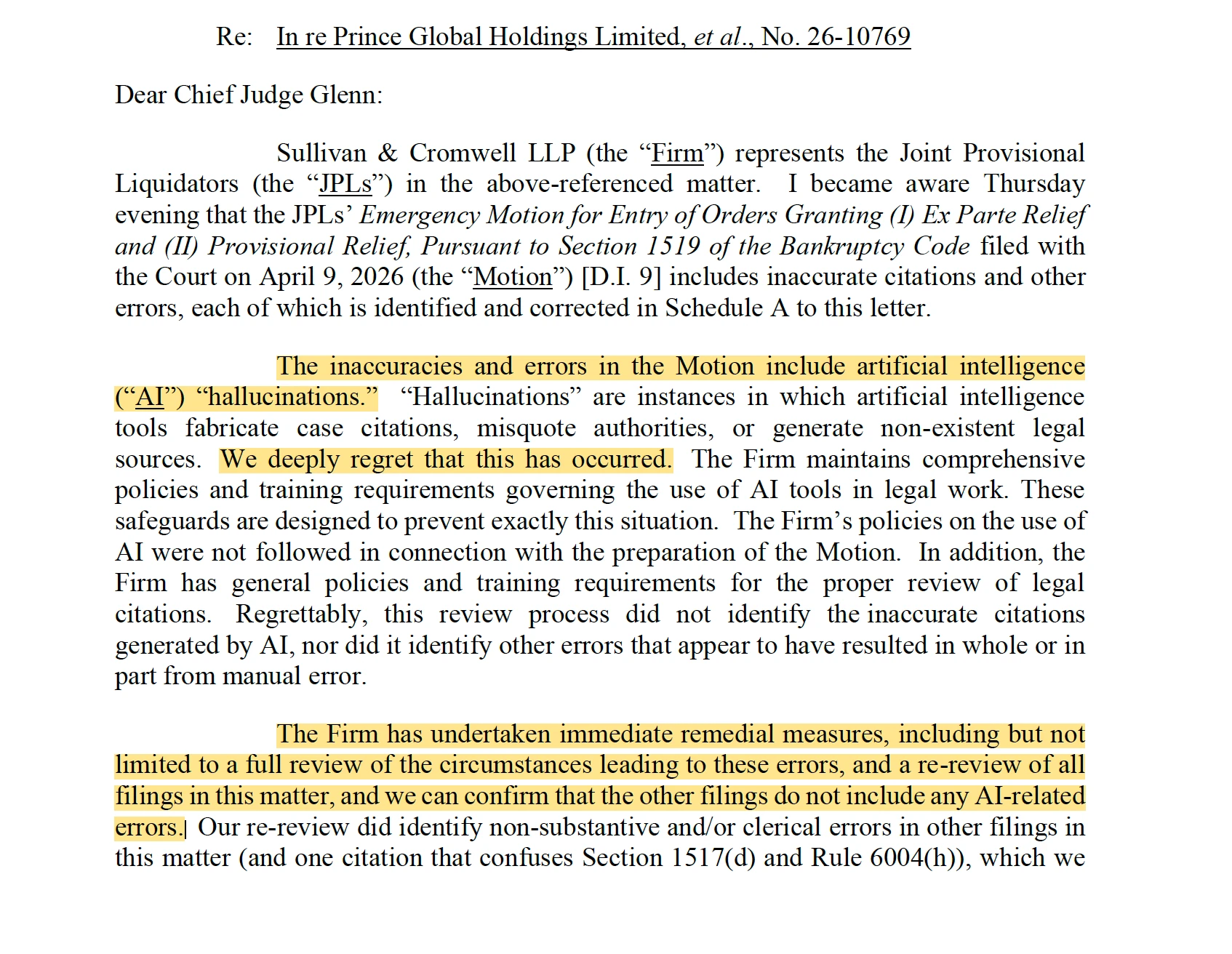
Getting ahead of it turns a potential disaster into a case study in crisis management: you stay in control, you show good faith, and you keep the one thing that matters most, the court’s trust.
Brevity wins
Brevity has always been a virtue. In the age of AI it is a survival skill. A model can pad a filing to a hundred pages in minutes, and parties lean on that constantly. The problem is that no judge can actually get through it.
A lean filing is far more likely to be read in full and to land. Resist the urge to “strengthen” your position with one more minor point; it just blurs your real arguments and drains the patience of a judge who is already buried. The job is to fit in every argument that carries weight while holding the judge’s attention. More pages mean more arguments, and worse odds the judge reaches the end. The sweet spot is where those two lines cross.
Guard confidentiality
Confidentiality is the bedrock of the lawyer-client relationship. A client trusts that whatever they hand their lawyer stays with the lawyer.
Lawyers and clients have passed information through cloud services for decades, though: email like Outlook, messaging apps, file storage. In each of those, the provider can technically reach the data. That rarely worried anyone, because two things covered it: the end-to-end encryption the popular messengers promise, or a clear term in the user agreement that the service won’t use what passes through it.
AI puts that old problem in a new light. Some providers may feed conversations straight into training the next version of their model, which raises a fair worry: could a client’s private data resurface as a future model learns?
So the confidentiality question today comes down to one thing: does the model train on the data in the chat you’re working in? The market has settled into two answers.
A personal or free account
- Training on your data
- On by default
- Retention
- The provider keeps your chats, and for years if you allow training
- Third-party access
- Possible under the service terms
Enterprise or API access
- Training on your data
- Off by default, by contract
- Retention
- Limited; you can negotiate Zero Data Retention
- Third-party access
- A contractual confidentiality guarantee is available
Professional norms are already forming around this. A client has every right to ask a few pointed questions, and the lawyer should have the answers ready:
- Is AI used at all in providing the legal services, and does the client consent to it?
- Is the data anonymized before it is uploaded?
- Which models, and which providers, are used?
- Does the firm have a direct contract (a subscription) with the model provider?
- Does the lawyer guarantee the model does not train on the uploaded data?
- Is a Zero Data Retention (ZDR) agreement in place?
More and more, these come up when the engagement is signed.
Protect privilege
Confidentiality is the lawyer’s duty to keep a client’s information from outsiders. Privilege goes further. It is a protection the law grants the lawyer-client relationship and backs with hard guarantees in litigation. But it rests on that same confidentiality, and the moment the material reaches an outsider, the protection can fall away. Uploading a client’s data to a public AI is, for these purposes, handing it to an outsider.
Privilege and the work-product doctrine
Common-law systems offer two protections. Attorney-client privilege shields confidential communications with a lawyer made to get legal advice; it belongs to the client and is lost on voluntary disclosure to any third party. The U.S. Supreme Court called it “the oldest of the privileges for confidential communications known to the common law” (Upjohn Co. v. United States, 449 U.S. 383 (1981)). There is also the work-product doctrine (Hickman v. Taylor, 329 U.S. 495 (1947), and Rule 26(b)(3) of the Federal Rules of Civil Procedure), which covers materials prepared in anticipation of litigation. That protection is sturdier: it is generally lost only on disclosure to a litigation adversary. Under ABA Formal Opinion 512 (2024), a lawyer needs the client’s informed consent before entering information about the client into a self-learning AI, and a boilerplate clause in the engagement letter does not count as that consent.
Compare the prompts a lawyer writes to build a case: where they carry counsel’s own thinking, courts have shielded them as work product (Tremblay v. OpenAI, N.D. Cal. 2024). The lesson is simple. The lawyer should do the AI work on a matter, through enterprise tools with real confidentiality safeguards. And it is worth telling clients, for their own sake, not to “consult” public chatbots.
The rules will keep changing
Courts and regulators are catching up to a world where most lawyers use AI every week. Rules on AI in disputes are landing at several levels at once: courts decide how existing rules apply, bar regulators police professional ethics, and legislators take up the delivery of legal services through AI. Expect those rules to keep getting more detailed. Here is a snapshot across the main forums: international arbitration, the U.S. courts and bar regulators, the EU, the U.K., and a few other jurisdictions.
| Forum | Area | What it requires | Source |
|---|---|---|---|
| International arbitration | SVAMC | The Guidelines on the Use of AI in Arbitration (2024) come down to a few principles: competence and good faith, safeguarding the confidentiality of case data, human responsibility for the result, and disclosure of AI use decided case by case, especially where it affects the evidence or the outcome. | SVAMC, 2024 ↗ |
| CIArb | The Guideline (2025) focuses on the competence of participants, protecting confidentiality, a bar on arbitrators delegating the decision to AI, and the tribunal’s power to give the parties procedural directions on AI use. | CIArb, 2025 ↗ | |
| JAMS | Special rules for disputes over AI systems. By the parties’ agreement the proceeding can move into a closed mode with a protective order. Experts may inspect the model’s code and check what data it was trained on, but only in an isolated, secured digital environment. | JAMS ↗ | |
| AAA-ICDR | Guidance for arbitrators (2025): AI supports the arbitrator’s judgment but does not replace it; conclusions are verified against primary sources; the use of generative AI is disclosed where it materially affects the process or the reasoning. | AAA-ICDR ↗ | |
| United States | Courts | There is no single federal standard. After Mata v. Avianca, many judges issued their own standing orders: some require certification, some disclosure, some human verification of every citation. Check the specific judge’s order before you file. | Standing order (E.D. Pa.) ↗Order tracker ↗ |
| Legal ethics | The ethics duties apply to generative AI (ABA Formal Opinion 512 and state bar opinions): competence, confidentiality of client data, mandatory verification of AI citations against the original, and reasonable fees. | ABA Op. 512 ↗Florida Bar 24-1 ↗NYC Bar 2024-5 ↗ | |
| European Union | Regulation | The AI Act does not regulate lawyers directly, but AI that helps a court research and interpret the law is classed as high-risk. Article 50 also requires AI-generated content to be marked. The Act is rolling out in phases; high-risk obligations are due to apply from August 2026, though a pending amendment may push some of them to 2027. | AI Act, 2024/1689 ↗ |
| United Kingdom | Courts and regulators | The approach is broadly permissive but cautious. The judicial guidance (updated 2025) and the regulators (SRA, Bar Council): responsibility for the output cannot be shifted onto the technology, non-public information must not be entered into public AI tools, and AI output must be checked. | Judicial guidance ↗Bar Council ↗ |
| China | Courts | The Supreme People’s Court fixed AI’s supporting role: it does not replace the judge, its outputs are reference material only, and the decision is always rendered by a human. AI use must be safe, lawful, and transparent. | SPC opinion, 2022 ↗ |
| India | Courts | The Kerala High Court barred using AI to write findings or make decisions: it is allowed only as an assistive tool under full human control. Any AI output, citations, and translations are subject to audit, and each use is logged. | Kerala HC policy, 2025 ↗ |
| UAE | Courts (DIFC) | The DIFC Courts require early disclosure of AI use, verification of generated content against primary sources, and full responsibility for it. Confidential client data may not be entered into AI without the client’s consent. | DIFC Courts, 2023 ↗ |
The rules change almost monthly, there is no single standard, and there probably never will be one. Get in the habit of checking five things before every filing: the specific judge’s standing order or the tribunal’s rules, the AI service’s policy on your data, any data-protection limits on what you can upload, any duty to disclose that you used AI, and, of course, hallucinations in whatever the model produced.
AI Hallucination Cases
An open database of court cases in which AI-generated fake quotes or precedents were caught. The source of the “more than 1,600” figure.
A continuously updated tracker of cases worldwide, from the first matters in 2023 to today.
Open the database ↗
Formal Opinion 512: Generative AI Tools
The ABA’s first formal opinion on the ethics of lawyers using generative AI: competence, confidentiality, verification, fees.
Lawyers must critically evaluate AI output and remain fully responsible for the final product.
Find the opinion ↗
$110,000 sanction for AI hallucinations
Attorneys Stephen Brigandi and Tim Murphy were sanctioned a total of $110,000 over briefs with 15 nonexistent cases and 8 fabricated quotations. The largest AI-hallucination sanction in the U.S.
The court called it “a notorious outlier in both degree and volume.”
ABA Journal ↗
Nippon Life v. OpenAI
Nippon Life Insurance Co. of America v. OpenAI Foundation & OpenAI Group PBC. One of the first serious suits against an AI developer for effectively practicing law without a license.
It puts the question of where the line falls between an AI tool and the unauthorized practice of law (UPL).
Docket ↗
An AI System Built by Litigators, for Litigators
Christopher Kercher (Quinn Emanuel) on a Claude-based platform, “Kerch Bench,” and three principles for working with the model.
“Distill the data; use the model as an interlocutor you argue with; and make it argue with you.”
Listen to the episode ↗
Some Simple Economics of AGI
The bottleneck in the economics of AI is not the machine’s intelligence but the throughput of human checking (the “cost of verification”).
“The binding constraint on growth is no longer intelligence but human verification bandwidth.”
Read the preprint ↗
In re Prince Global Holdings Limited
Sullivan & Cromwell disclosed AI “hallucinations” in its own motion to the court and corrected every citation.
“…the Motion … includes inaccurate citations and other errors … The inaccuracies and errors include artificial intelligence hallucinations.” No. 26-10769.
Read the letter ↗
United States v. Heppner
Brad Heppner (GWG / Beneficient) ran his defense strategy through a personal Claude account. The court held, for the first time in the U.S., that 31 such documents were protected by neither privilege nor the work-product doctrine.
AI is not a lawyer, and a consumer service’s user agreement defeats confidentiality; forwarding the output to a lawyer later does not make it privileged.
Docket ↗
Upjohn Co. v. United States
The U.S. Supreme Court called attorney-client privilege “the oldest of the privileges for confidential communications known to the common law” and protected a company’s communications with its lawyers.
“…the oldest of the privileges for confidential communications known to the common law.”
449 U.S. 383 ↗
Tremblay v. OpenAI
The flip side of Heppner: AI prompts the lawyer drafted to prepare the complaint were protected by the court as work product.
The lawyer’s prompts reflect counsel’s legal theory and mental work, so they fall under opinion-work-product protection.
Docket ↗
New York Times v. OpenAI
A court ordered OpenAI to preserve all ChatGPT conversations, including those users had deleted. Contractual retention terms do not protect against a court order.
A May 13, 2025 order to preserve all output logs; the obligation was lifted in fall 2025, but what had been saved stayed in the case.
The order explained ↗
Mata v. Avianca
The landmark case that started it all: lawyers sanctioned $5,000 for a brief built on ChatGPT-invented cases. It prompted the wave of judicial standing orders on AI.
Mata v. Avianca, Inc., 678 F. Supp. 3d 443 (S.D.N.Y. 2023). The fictitious “Varghese” opinion became the textbook example of an AI hallucination in court.
Docket ↗
Future Ready Lawyer 2026
An annual survey of legal professionals. The source for the adoption figure: 92% now use at least one AI tool in daily work.
AI use has gone mainstream across the profession, with most respondents also reporting weekly time savings.
Read the report ↗Disclaimer
This material is for information only and is not legal advice. The figures, case details, and ratings are illustrative and should be verified independently. The decision tree and the payoff ratings are notional. For advice on using AI in disputes, on assessing the merits of a case, or on internal policies, contact Buzko Krasnov.